
How do I leave a comment?

Posted by Sarah on Thursday Feb 18, 2010 Under Blog: How to..., Give Aways
How do I leave a comment?

A few people have asked me how to leave a comment on MyLittleBoudoir.com. This made me realize that perhaps it’s not so obvious. I recognize that the font size is rather small and tends to blend in with my “tags”. And since I willfully admit that I have no idea how to change the font size in that area, I will instead provide you with a quick visual tutorial:

Step one:
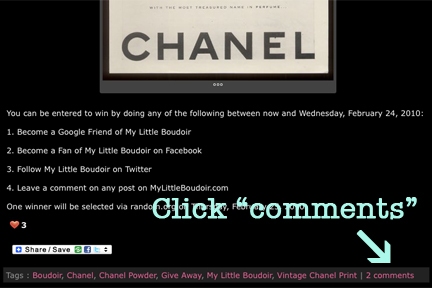
°°°

Steps two through six:
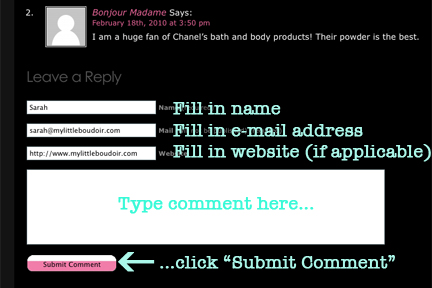
°°°

I love to hear your feedback, so feel free to comment as much as you like! Plus, sometimes it can even be a way to enter for a give-away, like this vintage Chanel print ad.

  • Share/Bookmark

Related posts:

  1. Give-Away: The Carrie Diaries
  2. Give-Away: Vintage Chanel Print
  3. Give-Away: Signed Copy of “Summer at Tiffany” By Marjorie Hart
  4. Winner: Vintage Chanel Print
  5. Give-Away: Turbie Twist

6 Responses to “How do I leave a comment?”

  1. Paige Says:

    Thanks! It did take me a while to figure this out.

  2. Williams Guziak Says:

    Exactly, what i was looking for. Thank you.

  3. Gabrielle Says:

    And this is why I love mylittleboudoir.com. Surprising posts.

  4. Love quotes Says:

    you have a professional layout of your blog, cheers

  5. Stanford Char Says:

    This is exactly what I was searching for on bing, I guess I got my answer! lol

  6. Travel Blog Says:

    Right on !! Damn Im becoming hooked on your blog :)

Leave a Reply

?>
Better Tag Cloud